# JSON Canvas Editor
A native desktop editor for the [JSON Canvas](https://jsoncanvas.org) 1.0 file
format, written in Rust. It runs on Windows and Linux from a single binary and
reads and writes plain `.canvas` files on the local disk — there is no server,
no account and no hidden state.
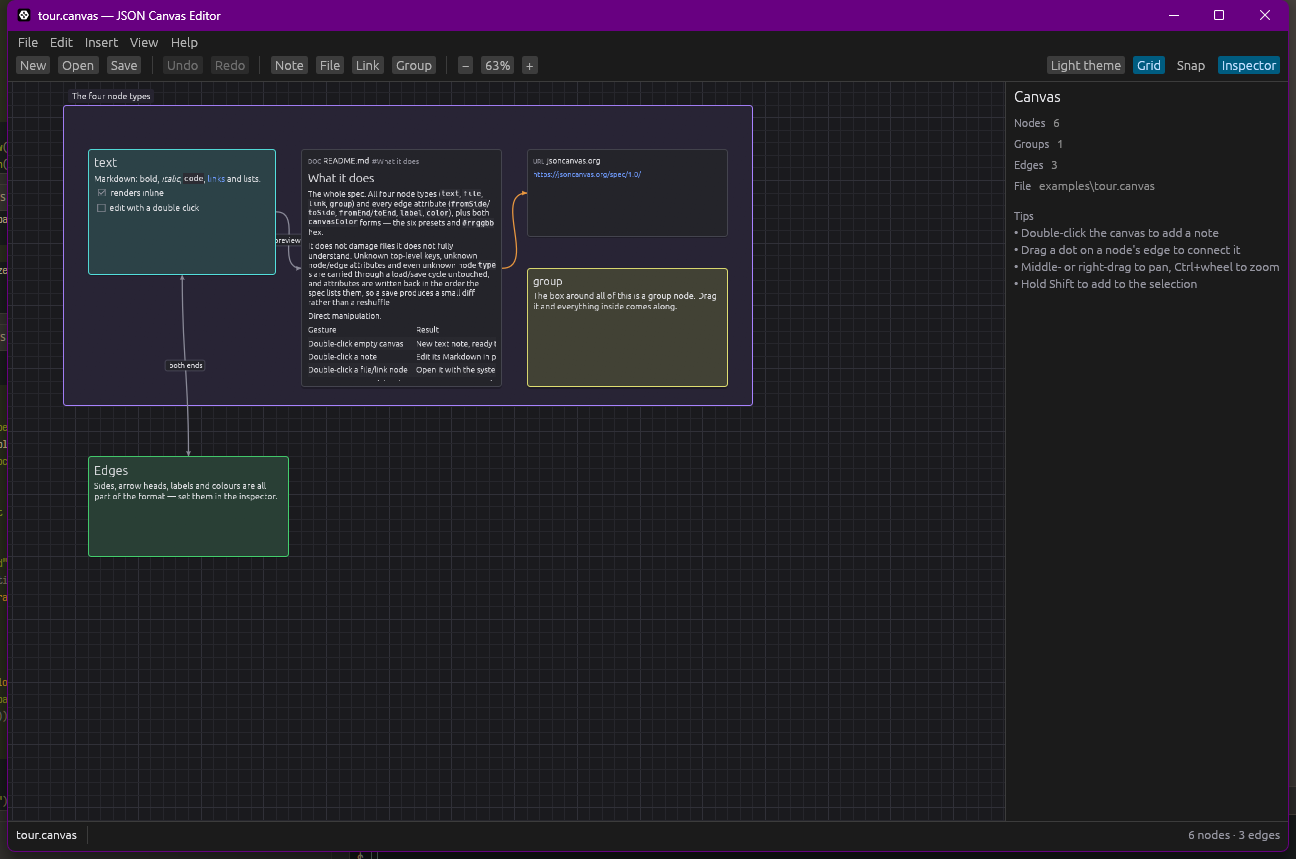
## What it does
**The whole spec.** All four node types (`text`, `file`, `link`, `group`) and
every edge attribute (`fromSide`/`toSide`, `fromEnd`/`toEnd`, `label`, `color`),
plus both `canvasColor` forms — the six presets and `#rrggbb` hex.
The format as this editor reads and writes it is written down in
[`spec/spec.md`](spec/spec.md), the handful of additions to JSON Canvas 1.0 are
listed on their own in [`spec/extensions.md`](spec/extensions.md), and the
original 1.0 spec sits next to them in [`spec/1.0.md`](spec/1.0.md) to diff
against.
**It does not damage files it does not fully understand.** Unknown top-level
keys, unknown node/edge attributes and even unknown node `type`s are carried
through a load/save cycle untouched, and attributes are written back in the
order the spec lists them, so a save produces a small diff rather than a
reshuffle.
**Direct manipulation.**
| Gesture | Result |
| --- | --- |
| Double-click empty canvas | New text note, ready to type in |
| Double-click a note | Edit its Markdown in an editor window |
| Double-click a file/link node | Edit a plain-text file, or open anything else with the system default application |
| Right-click empty canvas | Menu of every node type, added where you clicked |
| Right-click a node | Edit, fit the card to its text, colour, bring to front / send to back, delete |
| Drag a dot on a node's edge | Draw a connection; drop it on empty canvas to create the node too |
| Drag a corner or side handle | Resize |
| Drag a group | Moves the group and everything inside it |
| Drag on empty canvas | Rubber-band selection (hold Shift to add) |
| Middle- or right-drag | Pan |
| Drop files on the window | A file node each; a `.canvas` file opens instead |
| Wheel | Zoom around the pointer, anywhere on the canvas |
**Markdown in text nodes**: headings, bold/italic/strikethrough, inline and
fenced code, quotes, bullet, numbered and task lists, rules, images and links.
Links are clickable; a link to another `.canvas` file opens it in the editor.
**File node previews**: images are rendered inline, text files are previewed as
Markdown, and a `subpath` such as `#Design` shows just that section of the file.
Group `background` images are drawn with the fitting their `backgroundStyle`
asks for (`cover`, `ratio` or `repeat`). Paths are stored relative to the
canvas, so a canvas plus its files stays portable.
**A display text for link nodes**: name a link in the inspector and the canvas
shows the name instead of the address, with the full URL in its tooltip. It is
stored as a `label` attribute — the name groups and edges already use — so a
tool that does not know about it carries it through untouched. This is an
addition to the format; see [`spec/extensions.md`](spec/extensions.md).
**Dropping and pasting things in**: drop files on the window and each becomes a
file node, with its path stored relative to the canvas when it lives beside it.
Paste text and it becomes a note, or a link node when the text is a URL. A copy
made in the editor goes onto the system clipboard as JSON Canvas, so it pastes
back into another window as nodes rather than as text.
Dropping *text* on the window does nothing, and no drop lands under the pointer:
the windowing layer this editor is built on accepts file drags only, and discards
the position that comes with them. Paste is the way in for text.
**The usual editor comforts**: undo/redo of every change, copy/paste/duplicate,
grouping, alignment, z-order, a properties inspector, snap-to-grid, light and
dark themes, and a warning before you lose unsaved work.
## Building and running
```sh
cargo run --release # start with an empty canvas
cargo run --release -- board.canvas
```
The release binary is self-contained:
```sh
cargo build --release # target/release/jsoncanvas-desktop[.exe]
```
* **Windows** — nothing beyond a Rust toolchain (MSVC or GNU).
* **Linux** — the usual desktop development packages for windowing and
rendering, e.g. on Debian/Ubuntu:
```sh
sudo apt install build-essential pkg-config libx11-dev libxcursor-dev \
libxrandr-dev libxi-dev libgl1-mesa-dev libwayland-dev libxkbcommon-dev
```
File dialogs use the XDG desktop portal, so no GTK development packages are
needed; install `xdg-desktop-portal` and a backend for your desktop if it is
not already present.
Run the tests with `cargo test` (the model, geometry, Markdown and editing logic
are covered headless — no display required).
## Keyboard shortcuts
| | |
| --- | --- |
| Ctrl+N / O / S | New, open, save |
| Ctrl+Shift+S | Save as |
| Ctrl+Z / Ctrl+Shift+Z | Undo, redo |
| Ctrl+C / V / D | Copy, paste, duplicate |
| Ctrl+A | Select everything |
| Ctrl+G | Put the selection in a group |
| Ctrl+I | Show or hide the inspector |
| Delete | Delete the selection |
| F2 | Edit the selected node |
| F | Zoom to the selection |
| Escape | Stop editing, clear the selection |
| Arrow keys | Nudge by 1 (Shift: 10) |
| Ctrl+0 / 1 | Zoom to fit, actual size |
## How it is put together
The UI toolkit is [egui](https://github.com/emilk/egui) via `eframe`. An
infinite canvas is essentially one large custom-painted widget, which is what
immediate-mode GUI is good at, and it builds to a single binary on both targets
without a GTK or Qt runtime. Pan and zoom are a transform on a dedicated egui
layer, so real widgets (file previews, links) keep working while the canvas is
scaled. Cards crop what they cannot show and editing happens in a window of its
own, so nothing on the canvas is hidden behind a scroll bar.
| Module | Responsibility |
| --- | --- |
| `model.rs` | The file format: parsing, writing, round-trip fidelity |
| `document.rs` | Open document: path, dirty state, undo history |
| `geometry.rs` | Node boxes, edge anchors, Bézier routing, hit testing |
| `view.rs` | The canvas: painting, selection, and every gesture |
| `nodes.rs` | Node bodies: Markdown, file previews, links |
| `markdown.rs` | The Markdown subset used by text nodes |
| `inspector.rs` | The properties panel |
| `theme.rs` | Palettes and the six preset colours |
| `app.rs` | Menus, toolbar, dialogs, file handling, shortcuts |
## Licence
MIT.